The company's Workspace manager user should verify the policy settings of MSFT Teams.
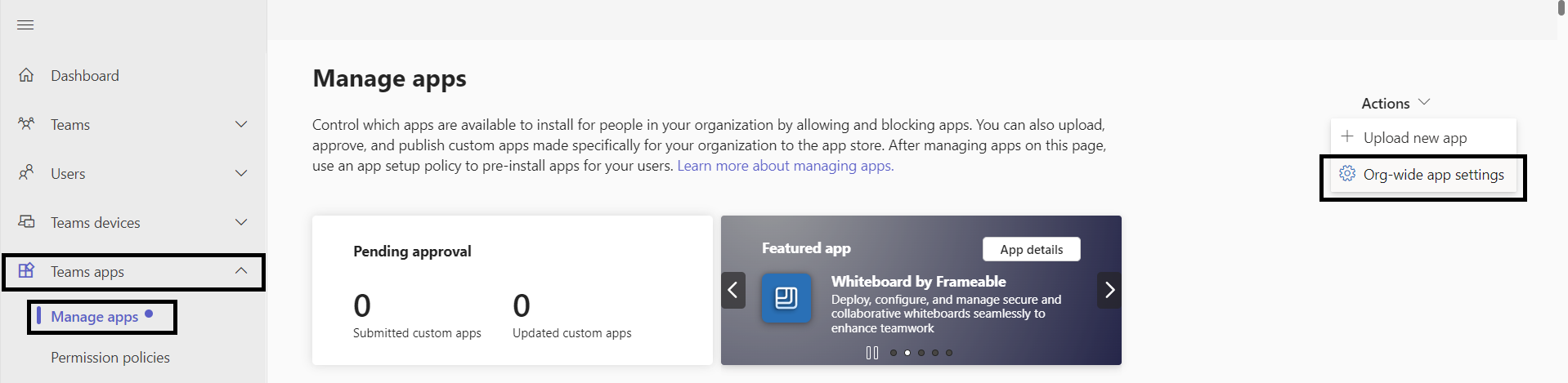
Step 1: Login to https://admin.teams.microsoft.com/
Step 2: Enter Teams apps in the left menu.
Step 3: Select Manage apps.
Step 4: The admin should click on the Org-wide app settings button:
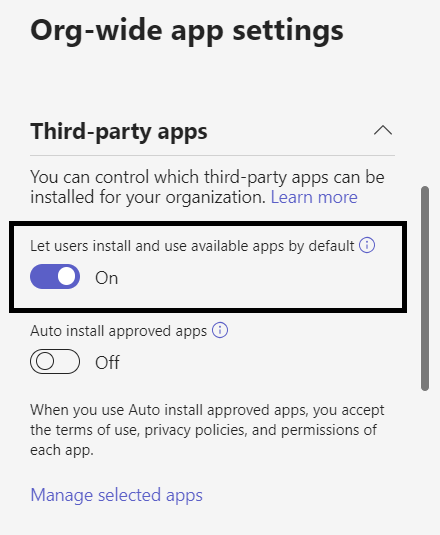
Step 5: Verify that all the flags are enabled/on, especially the Custom Apps option.
Step 6: Go to Setup policies
Step 7: Click on Global (Org-wide default)
Step 8: Enable the upload of custom apps which is the Upload custom apps option.
IMPORTANT! This policy (step 8) takes approximately 15 hours to be taken into account. Thus, it will take a day for the changes to take effect.
And now, all is set! You can continue to install the app.
If you have any questions or inconveniences, please contact us via email at support@meetlara.ai.
¿Le fue útil este artículo?
¡Qué bueno!
Gracias por sus comentarios
¡Sentimos mucho no haber sido de ayuda!
Gracias por sus comentarios
Comentarios enviados
Agradecemos su iniciativa, e intentaremos corregir el artículo